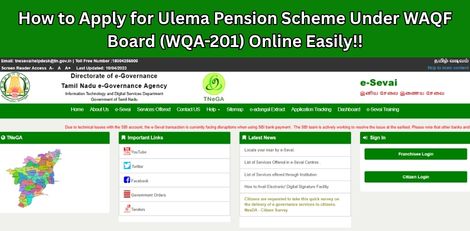
How to Apply for Ulema Pension Scheme Under WAQF Board (WQA-201) Online Easily!!
Service Code: WQA-201 | Department: BC MBC and Minority Department / WAQF Board Purpose: The Application for Ulema Pension Scheme under WAQF Board service enables eligible Ulema (Islamic scholars) to apply for pension benefits through the e-District portal. This service is designed for:– Eligible Ulema/Imams seeking pension benefits under the scheme– Islamic scholars serving in recognized institutions– Religious teachers meeting eligibility criteria– Applicants with relevant religious education and service experience Required Information: Mandatory for Application:– CAN (Citizen Access Number) – Unique citizen identifier for the portal– Applicant personal details (name, father`s name, date of birth, etc.)– Contact details (mobile number, email ID, address)– Bank account details (for pension disbursement)– Service/Experience details (years of experience as Ulema)– Supporting documents (certificates, experience proof, etc.) Search Options for Existing CAN:– Applicant CAN Number– Applicant Name– Applicant Father Name– Applicant Mobile Number– Applicant Email Id– Applicant Date of Birth Note: Green asterisk signifies that search options are optional mandatory Special Requirements: – CAN Mandatory: Must have a valid Citizen Access Number (CAN) to apply– New User Registration: Applicants without CAN must register first to obtain CAN– OTP Verification: Mobile number verification required during application– Experience Criteria:– Physically Challenged applicants: Minimum 10 years of experience– Other applicants: Minimum 20 years of experience– Declaration: Must accept terms and conditions before submission– Document Upload: Mandatory supporting documents must be uploaded Step-by-Step Application Process: PART A: OPERATOR LOGIN AND SERVICE NAVIGATION 1. Access the Portal: Go to the [Tamil Nadu e-Sevai Portal](https://tnesevai.tn.gov.in) 2. Operator Login:– Enter your login credentials (username and password)– Enter the Captcha code displayed on screen– Click Login 3. Access Dashboard:– After successful login, you will be redirected to the e-SeSevai Dashboard 4. Navigate to Service:– Click on Services from the left panel– Department-wise service listing will appear– Click on BC MBC and Minority Department link– Alternatively, use Service Wise listing or Search to locate the service 5. Select Ulema Pension Scheme:– Click on WQA – 201 Application for Ulema Pension Scheme under WAQF Board– You will be redirected to the e-District Portal– Click Proceed to continue– Applicant search page will be displayed PART B: CAN REGISTRATION (FOR NEW USERS) 6. CAN Registration (if applicant does not have CAN):– Note: The green asterisk signifies that search options are optional mandatory– Click on the Register CAN button– CAN registration form will be displayed 7. Fill CAN Registration Form:– Enter all mandatory details in the following sections:– Applicant Detail: Name, father`s name, date of birth, gender, etc.– Current Address: Complete residential address– Bank Details: Bank name, branch, account number, IFSC code– Click Register to submit the form– On successful registration, CAN Number will be generated– The applicant can now proceed using this CAN number PART C: APPLICATION FOR ULEMA PENSION SCHEME 8. Search for Applicant (after CAN registration):– Enter the CAN number OR any one of the search fields:– Applicant Name– Applicant Father Name– Applicant Mobile Number– Applicant Email Id– Applicant Date of Birth– Click Search button– The corresponding record will appear in search results 9. Select Applicant Record:– Select the record by clicking the option button against the desired record 10. Generate and Verify OTP:– Generate OTP for verification– Enter the OTP received on registered mobile number– Once OTP is verified, screen will refresh 11. Proceed with Application:– Click Proceed to continue– Optional: CAN details can be modified by clicking Edit CAN Detail button– Save as New option allows saving same CAN with different applicant details 12. Fill Application e-Form:– Fill all mandatory details in the application form– Important fields include:– Physically Challenged status (Yes/No)– Year of Experience for Pension Scheme– If Yes (Physically Challenged): Minimum 10 years experience required– If No: Minimum 20 years experience required– Other relevant details as per schcheme requirements– Check the Declaration box to accept terms– Click Submit 13. Upload Supporting Documents:– Upload Supporting Documents page will be displayed– For each document:– Select the document type from dropdown– Choose the file from your computer– Click Upload– Upload all mandatory supporting documents as listed 14. Make Payment:– Click Make Payment once all required documents are uploaded– Select the Payment Type from dropdown– Click Confirm Payment 15. Download Acknowledgement Receipt:– On successful payment, applicant will be redirected to Acknowledgment Receipt page– Click Print Receipt to download/print the receipt– Save the receipt for future reference Document Requirements: Mandatory Supporting Documents (to be uploaded):– Educational qualification certificates (religious education)– Experience certificate (proof of service as Ulema/Imam)– Age proof (birth certificate, school certificate, etc.)– Identity proof (Aadhaar card, Voter ID, etc.)– Address proof (ration card, utility bill, etc.)– Bank account details (passbook copy, cancelled cheque)– Physically challenged certificate (if applicable, from competent authority)– Photograph (passport size, recent)– Any other document as specified by WAQF Board Payment Details: – Payment Type: Select from dropdown (options as applicable)– Payment Confirmation: Required to complete application After Submission: – Application Processing: Application reaches the concerned officer for further processing– Officer Actions: Officer may Approve, Return, or Reject the application– Notification: Applicant will be notified via SMS/Email about the decision– Status Tracking: Can be checked using application number/CAN number Important Notes: – Valid Credentials: User must have valid username and password– Mandatory Fields: Mandatory fields cannot be left blank– CAN Number: Essential for application; register if not already available– OTP Verification: Mobile number verification is mandatory– Correct Entries: Make relevant and correct entries only– Recheck Information: Recheck all entries before clicking Submit– Document Upload: Attachch mandatory/optional documents as per requirement– No False Entries: Do not make false entries– Experience Criteria: 10 years for physically challenged, 20 years for others – strictly enforced– Declaration: Must check the declaration box before submission– Receipt Retention: Keep the acknowledgement receipt for future reference– SMS/Email Updates: Ensure mobile number and email are correct to receive notifications Browser Requirements: – Browser: Google Chrome, Version 50 (or higher recommended)– Internet Connection: Stable connection required Assistance: – Apply Online: https://tnesevai.tn.gov.in– Visit: Nearest e-Sevai Centre / CSC Centre for application assistance– Help Desk: Contact CMS Computers LTD for technical support This guide is based on the Tamil Nadu e-District User Manual for Ulema Pension Scheme under WAQF Board. CMS Computers LTD.